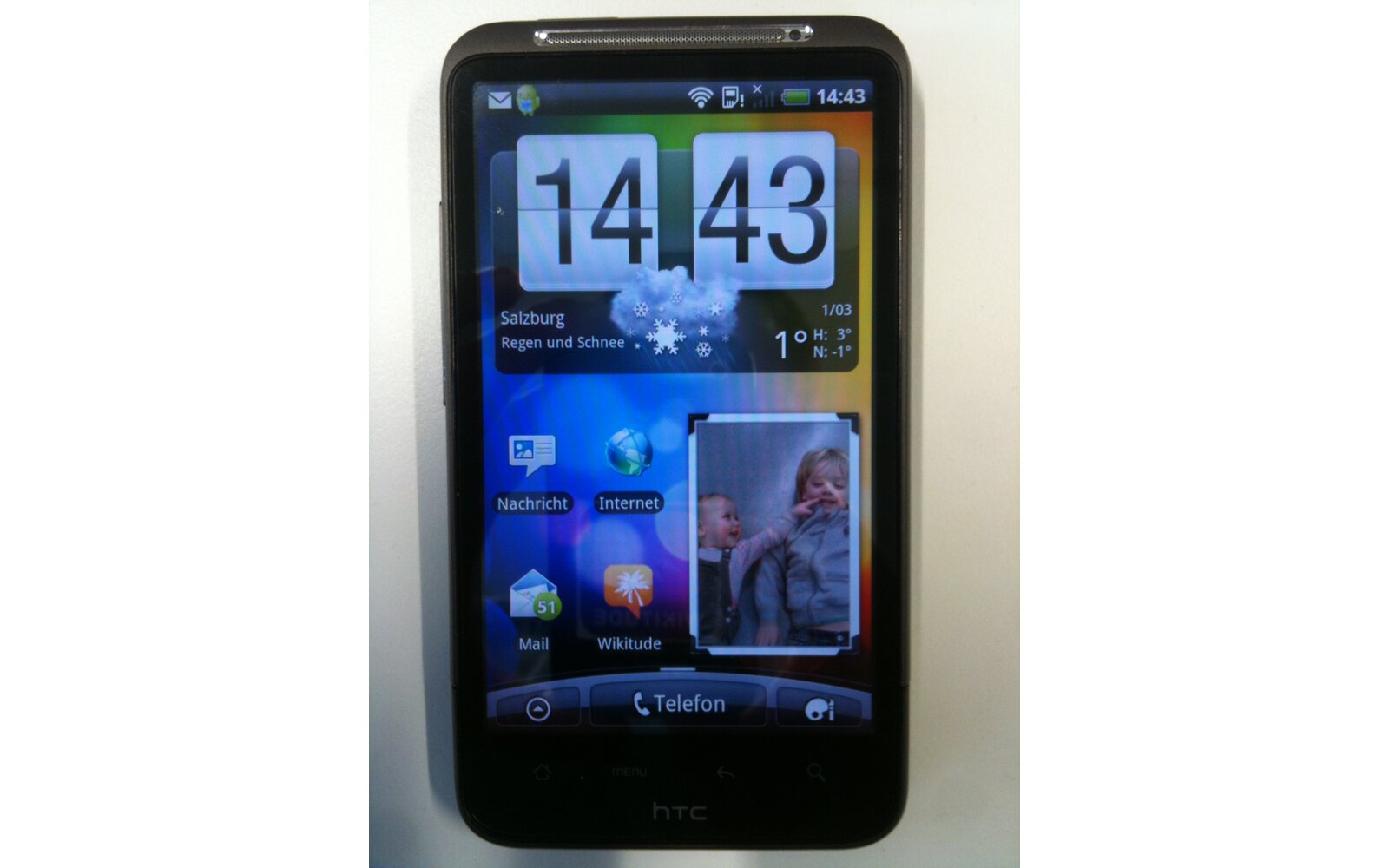
Following the launch of the Google Nexus One in the US, many Android users, especially in Europe, were eagerly waiting for a similar device to launch worldwide. The HTC Desire was officially announced during Mobile World Congress in February alongside the HTC Legend and HTC HD Mini but wasnât really a surprise thanks to the leaked roadmap that surfaced a few months earlier. Codenamed HTC Bravo, the Desire is essentially a Nexus One with a few hardware changes and HTCâs Sense UI sitting on top of Android 2.1. So how does it stack up against HTCâs other top of the line handset?
Hardware
If youâve been following closely the launch of the Nexus One back in January then you have probably seen it all. To put it simply: the HTC Desire is a Nexus One. The chassis is identical the specs and everything thing else besides the hardware button layout.
The Desire features Androidâs four buttons (Home, Menu, Back, and Search), which are actually ârealâ hardware buttons instead of capacitive like on the Nexus One, and also an optical track ad (that can be pressed) replacing the more conventional track ball found on the Google branded handset. There are no other major differences between both handsets.
The Desire (and N1) is HTCâs first Android device to feature Qualcommâs SnapDragon chipset (clocked @ 1 GHz) and has 512Mb of RAM & 512MB of RAM. Just like every other HTC handset released since the HTC Diamond, the Desire also packs a memory expansion slot, micro-sd (the Desire ships with a 4Gb card), and all the usual features you can expect from such a high end smartphone: aGPS, BT 2.1 + EDR, WiFi b/g/n, FM Radio, Digital Compass, FM Radio etc. But the hardware feature that really caught everybodyâs attention is the 3.7â WVGA AMOLED capacitive screen.
Check out the size comparison gallery of the HTC Desire vs the HTC HD2.
The Screen
Letâs talk a little bit about the Desire and Nexus One AMOLED screen. It took a little while but a couple of months after the Nexus One launched some users started to report that the handsets screen didnât really look quite right. They couldnât explain what was going on but it seems like the image wasnât as sharp as the specs suggested. The reason is fairly simple: The AMOLED panel used on the HTC Desire and the Nexus One uses a subpixels arrangement known as PenTile Matrix. As you can see in the picture below each pixel consists of a double-width blue or red subpixel element and a green subpixel element (2Â subpixels per pixels). Conventional LCDs (and other AMOLED panels) features 3 subpixels per pixels (RGB). The result of using this technology is that text looks fuzzy compared to other WVGA panels and color fringing is a lot more apparent in some cases. Click on the picture sbelow to see how it looks like up close (the HTC Desire is on top and the HD2 below)Â :
So does the PenTile panel really have an 800X480 resolution? The company argues that it is indeed the case, but the fact remains that compared side by side to a conventional RGB panel the Desire screen does look a lot fuzzier (especially when rendering text). The color dithering and fringing is also a lot more apparent (add also the fact that the panel is only 18bit compared to 24bit on the Motorola Droid and that drivers are only outputting 16bit colors). On the brighter side; I was pleasantly surprised to notice that the outdoors readability of the screen is just as good as on the HTC HD2. Contrary to what I original thought the AMOLED screen of the Desire performs just as good as the regular LCD TFT panel outside.
The Software
The HTC Desire runs on Android 2.1.1 with HTCâs famous Sense UI which is considered one of the best phone interfaces currently available. A couple of new additions and features have been added to this version like the new scenes creation functionality that lets you save any combination and arrangement of icons, widgets etc (I suggest you take a look at the video below to see it in action). The more visually noticeable change is the homescreen pinching gesture enabling the user a quick way to access all 7 panels without having to scroll left and right (the overview can also be accessed by pressing the home button when on the main homescreen).
One thing I would like to point out is that Iâm mainly a Windows Mobile user (my current daily device is an HD2) so it was really interesting for me to finally use an Android device for nearly 10 days. Android 2.1 is, as far as I am concerned, what Windows Mobile would/should have been if Microsoft didnât let it die (before the Windows Phone 7 reboot). All the advantages Microsoftâs highly customable OS are present in Android and all wrapped in a modern GUI with pretty good memory management.
Applications
Thereâs no shortage of great application on Android and the HTC Desire is definitely the best device to enjoy them all. The handset ships with a couple of handy applications courtesy of HTC like the weather application, stocks, calculator, stopwatch etc. You will also find a PDF reader, QuickOffice (lets you view Word Excel documents) and the FM radio application etc. If you need anything else youâll have to head over to the Android Market to find it. The Market is populated with a lot of useful handy applications like file explorers, advanced task managers (you can natively access a task switcher by long pressing the home button and quickly switch between your 6 last applications but you wonât be able to terminated them. Thatâs why a third party task manager can sometimes become handy).
Reading PDFâs is a whole lot easier and user friendly on the Desire thanks to the consistent UI unlike the mess currently found on the HTC HD2.
Opening HTML mail is also handled nicely although I had hoped that the email was automatically fitted to the screen (like on the iPhone).
One of the best features is the search functionality of Android that lets you search anything on your phone (or any applications that has a search function) or directly on the web just by hitting the button. One thing to note is that I was disappointed to find out that the awesome voice search and command feature was disabled on the Desire (unlike the Nexus One and Droid) and that Google Navigation only works in the UK and the UK right now.
It should also be noted that Wifi retour mode is present just like on the HTCHD2 and HTC HD Mini and HTC Legend.
The Android Market can sometimes be a little hard to browse if you are looking for a certain type of application (for some reason the iPhoneâs Appstore is better laid out IMO). My only complaint about apps on Android is the mandatory use of the hardware buttons; sometime it sort of breaks the user experience flow.
Browsing
This is where the HTC Desire really shines. The webkit browser is a joy to use and really puts Opera Mobile to shame. It can even be argued that itâs better than Safari Mobile in some cases. Check out the video below to see how it looks like:
The first thing you will notice is that both devices are nearly identical in speed when loading the web page but things are quite different once you start navigatingâŠPages are always render fully zoomed-out and fit perfectly in the whole screen on the HTC Desire (same as on the iPhone) unlike Opera Mobile on the HD2. The second advantage of the HTC Desire is the fact that you will never witness any checkerboard pattern once the page is fully loaded and even-though text re-flow is present it doesnât mess up your ability to zoom into pictures like Opera does on Windows Mobile. Finally the Desireâs browser support flash (not Flash 10.1 yet AFAICS) but as I mention in the video, the quality of the videos played through the browser is sub-par so you will need to check them out in the native YouTube application to experience them in their fully glory. One thing I donât like is the 3 tabs limitation and the need to always use the menu button to access the tabs menu. I wish all the UI elements were on screen (like opera and Safari). Another neat feature is the ability search word on Wikipedia or translate text directly in the browser: just highlight the text as if you wanted to copy it and you will be prompted with three options, hit the search icon and voila!
Performance
The device performed like I expected most of the time thanks to the SnapDragon chipset under the hood. But some things just didnât seem right. Take for example the Weather animations; they stutter (seem to lack frames), are slow to load compared to the HTC HD2 and donât even look as nice. Overall I would say that the HD2 was considerably faster in some cases. Open the mail box or the photo/video album was also slower on the Desire. Keep in mind that the device is still pretty fast but I find it interesting that the HD2 which has exactly the same specs but runs an ancient OS is snappier than Androidâs top of the line product. The one thing that made the HTC Desire really lag was the animated wallpaper (check out the video above). I checked out a couple of 3D games available on the Android Market but nothing was really that impressive (especially compared to whatâs out on the iPhone) and performance of some of them wasnât that great. Hereâs how the device stacks up against the HTC HD2 in the Openg GL ES 1.1 GLBenchmark:
| GLBenchmark Pro 1.1 Result Details : | HTC HD2 | HTC Desire |
| High-level 3D Performance | ||
| GLBenchmark HD ES 1.1 CPU Skinning : | 334 Frames | 1130 Frames |
| GLBenchmark HD ES 1.1 GPU Skinning : | 331 Frames | 1058 Frames |
| GLBenchmark Pro ES 1.1 CPU Skinning : | 422 Frames | 486 Frames |
| GLBenchmark Pro ES 1.1 GPU Skinning : | 218 Frames | 177 Frames |
| CPU Performance | ||
| CPU Performance: Float : | 2597 | 3169 |
| CPU Performance: Integer : | 21762 | 20100 |
| 3D Rendering Quality | ||
| 3D Rendering Quality: Bilinear Filter : | 100% (Success) | 97% (Success) |
| 3D Rendering Quality: Perspective Correction : | 100% (Success) | 100% (Success) |
| 3D Rendering Quality: Sub Pixel Precision : | 100% (Success) | 98% (Success) |
| 3D Rendering Quality: Trilinear Filter : | 100% (Success) | 97% (Success) |
| 3D Rendering Quality: Z-buffer Precision : | 98.7% (Success) | 98.7% (Success) |
| Triangles: Flat Shaded + Color 1.1 : | 1226 kTriangles/s | 1896 kTriangles/s |
| Triangles: Smooth Shaded + Color 1.1 : | 1226 kTriangles/s | 1896 kTriangles/s |
| Triangles: Textured 1.1 : | 1226 kTriangles/s | 1896 kTriangles/s |
| Triangles: Textured + Color 1.1 : | 1226 kTriangles/s | 1765 kTriangles/s |
| Fill Rate | ||
| Fill Rate: Multi-Textured 1.1 : | 127795 kTexels/s | 115507 kTexels/s |
| Fill Rate: Single-textured 1.1 : | 86016 kTexels/s | 109363 kTexels/s |
| Lighting | ||
| Lights: Ambient x 1 1.1 : | 1308 kTriangles/s | 932 kTriangles/s |
| Lights: Omni x 1Lights: Omni x 1 1.1 : | 1046 kTriangles/s | 932 kTriangles/s |
| Lights: Parallel x 1 1.1 : | 1291 kTriangles/s | 932 kTriangles/s |
| Lights: Parallel x 2 1.1 : | 1291 kTriangles/s | 932 kTriangles/s |
| Lights: Parallel x 4 1.1 : | 1259 kTriangles/s | 932 kTriangles/s |
| Lights: Parallel x 8 1.1 : | 1030 kTriangles/s | 932 kTriangles/s |
| Lights: Spot x 1 1.1 : | 964 kTriangles/s | 883 kTriangles/s |
| Texture Sizes | ||
| Texture Size: 1024×1024 1.1 : | 1226 kTriangles/s | 1798 kTriangles/s |
| Texture Size: 128×128 1.1 : | 1226 kTriangles/s | 1912 kTriangles/s |
| Texture Size: 256×256 1.1 : | 1226 kTriangles/s | 1896 kTriangles/s |
| Texture Size: 512×512 1.1 : | 1226 kTriangles/s | 1863 kTriangles/s |
| Texture Size: 64×64 1.1 : | 1226 kTriangles/s | 1912 kTriangles/s |
| Texture Filters | ||
| Texture Filter: LINEAR 1.1 : | 1226 kTriangles/s | 1880 kTriangles/s |
| Texture Filter: LINEAR_MIPMAP_LINEAR 1.1 : | 1226 kTriangles/s | 1912 kTriangles/s |
| Texture Filter: LINEAR_MIPMAP_NEAREST 1.1 : | 1226 kTriangles/s | 1912 kTriangles/s |
| Texture Filter: NEAREST 1.1 : | 1226 kTriangles/s | 1896 kTriangles/s |
| Texture Filter: NEAREST_MIPMAP_LINEAR 1.1 : | 1226 kTriangles/s | 1912 kTriangles/s |
| Texture Filter: NEAREST_MIPMAP_NEAREST 1.1 : | 1226 kTriangles/s | 1929 kTriangles/s |
Video playback was comparable to the HD2 but Android suffers greatly from the fact that there isnât any good multi-format/codec third party player like CorePlayer on WinMo so you are stuck with the default HTC player that only supports .mp4 .WMV .3GP videos.
HTC has promised DivX support and 720P encoding to me in a future update but nothing has emerged yet (and knowing HTC, I wouldnât be surprised if we never see this update..). One annoying thing that I noticed is the lack of kinetic panning in the photo album when you zoom into a picture (I canât figure why this thing isnât enabled?!)
Camera
The HTC Desireâs camera hardware is roughly the same one as on the HTC HD2 and HTC HD Mini. Itâs 5Mpix sensor coupled with a single LED Flash capable of shooting videos in WVGA. As you can see in my camera comparison the Desire fairs better than the HD2 and doesnât suffer from the pink/purple hue and has a more natural color reproduction.
On the other hand, video recording is IMO better on the HD2 even though the Desire captures at a higher resolution. Thereâs an easy way to increase the bitrate in the registry of the HD2 that gives significantly better image quality. Take a look a my comparison gallery here.
Call Quality
Call quality was on par with HTCâs other high end handsets like the HD2 (but belter than the HD Mini)and the Data connection worked with any major problems. Thereâs isnât much to say here (and thatâs a GOOD thing). The HTC Desire is top notch when it comes to handling your contacts and social feeds thanks to HTCâs Sense UI and FriendStream feature. The speaker on the back is of good quality but suffer from static when you up the volume (just like all phone speakers lately unfortunately).
Battery
Battery life was an issue with me. I just couldnât figure out why it was draining so fast even though I disabled all locations services and background Data transfers. One thing you will have to pay attention to is that the Wifi connection is always on by default (once you activate it) which means that your phone will still be connected even when turned off (sleep) unlike Windows Mobile devices where the Wifi receiver is automatically turned off when you turn the screen off. Thereâs an option buried somewhere that lets you set the Wifi to turn off after 15 minutes of inactivity. Anyway, I was a bit disappoint by the HTC Desireâs battery life (it has a 1400mahbattery and an AMOLED so there must be something wrong in the firmware) but it seems that Iâm not only person having this problem.
Conclusion
The HTC Desire is definitely the best overall Android device on the market even you donât need a hardware keyboard. Android needs a little bit of time to get used to, but it is worth it in the long run. No device is perfect and the Desire is far from it; the Pine Tile Matrix AMOLED screen is gorgeous to look at but the fuzzy text and color dithering can sometimes be a little annoying especially if you have already used a WVGA handset with a conventional RGB panel. The other disappointment was the battery life which I hope will be fixed in a future ROM. Besides these two negative points the Desire is a real joy to use and shows that even though Android is starting to suffer from fragmentation thereâs a lot of potential. The Desire manages to please casual users with HTCâs flashy Sense UI and geeks who love to tweak their handsets on a daily basis thanks to the Google’s Android OS.
Pros:
-Â Â Â Â Â Â Â Â Â Android 2.1
-Â Â Â Â Â Â Â Â Â The WebKit based browser
-Â Â Â Â Â Â Â Â Â HTC Sense UI
-Â Â Â Â Â Â Â Â Â All the features and applications available
-Â Â Â Â Â Â Â Â Â The AMOLED screenâs contrast and vivid colors
-Â Â Â Â Â Â Â Â Â Form factor
-Â Â Â Â Â Â Â Â Â Camera Quality (Still Shots)
Cons:
-Â Â Â Â Â Â Â Â Â Battery Life
-Â Â Â Â Â Â Â Â Â The Android UX is sometimes confusing
-Â Â Â Â Â Â Â Â Â The AMOLED screenâs PenTile Matrix Panel (Fuzzy text and dithering)
-Â Â Â Â Â Â Â Â Â Video recording quality


Recent Comments